Airbnb API Key: How to Get One in 2026
Airbnb won't issue you an API key, but you can get one in under a minute from a third-party Airbnb API. Step-by-step setup, key format, and your first call.
You can’t get an Airbnb API key from Airbnb. You can get one in about a minute from somewhere else.
Airbnb’s only official API is the invite-only Partner API, with no self-serve key. So when developers search for an Airbnb API key, what they actually need is a third-party API that returns public listing data. This guide shows how to get one, what it looks like, and how to make your first call.
Can you get an API key directly from Airbnb?
No. Airbnb’s only public-facing API is the Partner API, and it’s a closed, invite-only program for vetted property managers and channel managers — no signup form, no developer portal, no self-serve key. For reading listing data (prices, reviews, availability), you use a third-party Airbnb API instead, which issues keys on demand.
This trips up a lot of people who expect a Stripe-style developer dashboard from Airbnb. It doesn’t exist.
The good news: a third-party key takes the friction to near zero. You sign up, click a button, and you’re authenticated. No application, no approval queue.
How do you get an Airbnb API key, step by step?
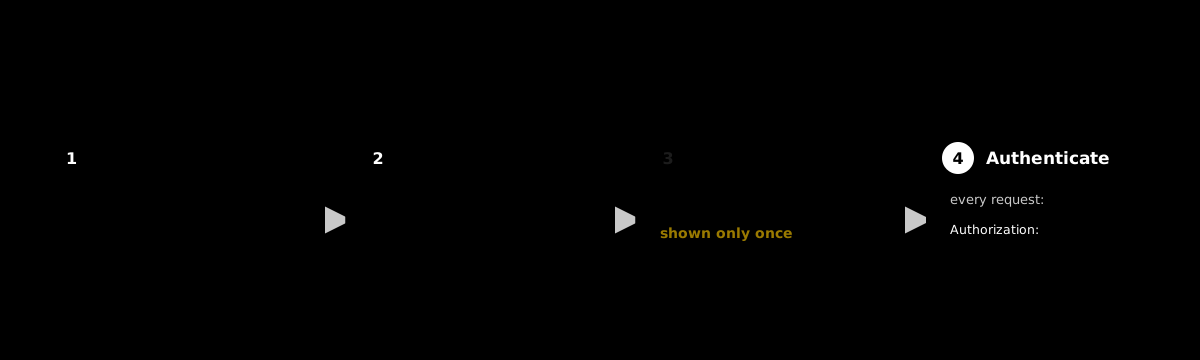
Sign up for a third-party provider, open the keys page in the dashboard, create a key, and copy the secret. The whole flow takes under a minute and needs no credit card. From there you pass the key as a bearer token on every request. Here’s the exact sequence with Staying API.
- Sign up free. Create an account at stayingapi.com. You get 100 credits instantly, no card required.
- Open the keys page. Go to
/app/keysin the dashboard. - Create a key. Click Create key, name it (e.g.
production), and copy the secret. It’s shown exactly once. - Store it safely. Drop it into an environment variable or secrets vault before you close the tab.
That’s it. The key is live immediately — no waiting on review.
What does an Airbnb API key look like?
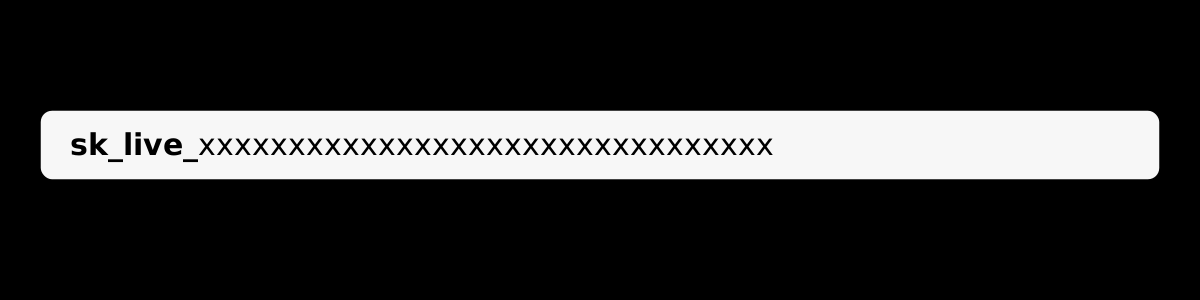
A Staying API key starts with the prefix sk_ followed by 32 base64url characters. The prefix tells you it’s a secret key and is safe to search for in logs; the 32-character body is the part you protect. You pass the whole thing as a bearer token in the Authorization header.
sk_live_xxxxxxxxxxxxxxxxxxxxxxxxxxxxxxxx└──┬──┘ └──────────────┬───────────────┘ prefix 32 secret charactersThe full secret is shown once at creation and never stored in plain text on the provider side. If you lose it, you don’t recover it — you revoke and create a new one.
How do you make your first authenticated request?
Pass your key in the Authorization header as Bearer sk_live_... on a GET to the stays endpoint. You get back a canonical Stay object as JSON, with a request_id you can quote to support. No session and no token exchange; the header is the whole auth story.
curl https://api.stayingapi.com/v1/stays/1135700964697993602 \ -H "Authorization: Bearer sk_live_xxxxxxxxxxxxxxxxxxxxxxxxxxxxxxxx"A successful call returns 200 with the listing data. If the header is missing you get 401 unauthenticated; if the key is wrong or revoked, 401 invalid_key. The quickstart walks through search and sub-resources next.

For AI agents, there’s a second path: OAuth 2.1 with PKCE against the MCP server. The resulting token works in the same Authorization: Bearer header, so Claude or ChatGPT can call the API directly. See the authentication reference.
How should you store and secure your Airbnb API key?
Treat the key like a password: keep it server-side, never ship it in client code, and store it in an environment variable or secrets manager. Use a separate key per environment so you can revoke one without breaking the others, and rotate by revoking and re-creating rather than reusing. A revoked key stops working within seconds.
The rules that actually matter:
- Never expose it client-side. A key in front-end JavaScript is a key anyone can copy.
- One key per environment. Separate
dev,staging, andproductionso a leak is contained. - Rotate by revoke + recreate. Don’t try to amend a key; kill it and mint a new one.
- Watch your quota. Every call spends credits; a leaked key can also drain your balance.
If a key ever leaks, revoke it at /app/keys immediately. The old key returns 401 invalid_key on the next call, and you swap in the new one.

What can you do with the free key’s 100 credits?
Quite a lot, because you only spend credits on what you pull. A single stay lookup is 1 credit, an address resolution is 3, and a search page is 12. So 100 free credits is roughly 100 listing lookups, or 33 address resolutions, or about 8 full search pages — enough to test every endpoint before you pay.
That free tier is meant for real evaluation, not a toy. You can profile a small comp set, pull reviews and availability, and see the actual JSON shape before committing to a plan.

When you need more, paid plans add credits and lift the rate limit from the free tier’s 20 requests per minute up to 200, 300, or 1,500.
Why is my Airbnb API key not working?
Most key failures are one of three errors, and the JSON code field tells you which. 401 unauthenticated means no Authorization header reached the server. 401 invalid_key means the key is wrong, revoked, or from the wrong environment. 429 quota_exceeded means the key is fine but you’re out of credits. Each has a different fix.
401 unauthenticated— the header is missing or malformed. SendAuthorization: Bearer sk_live_...exactly.401 invalid_key— you copied a partial secret, or the key was revoked. Re-check it at/app/keysand mint a new one if needed.429 quota_exceeded— valid key, empty balance. Top up or wait for renewal; retrying won’t help.429 rate_limited— you’re over your plan’s requests-per-minute. Honor theretry-afterheader and slow down.
Every error response includes a request_id. Quote it to support and they can trace the exact call.
Get your key and make a call
Getting an Airbnb API key isn’t the hard part anymore — Airbnb’s gate is, and a third-party API routes around it in a minute.
Create your free key, paste it into the curl command above, and watch real listing data come back as JSON. 100 credits are on the house, no card required.
Frequently asked questions
- Can you get an API key directly from Airbnb?
- No. Airbnb's only official API is the Partner API, which is invite-only and has no self-serve key. To get a working key today, you use a third-party Airbnb API that returns public listing data. You sign up, open the dashboard, and generate a key yourself — no Airbnb approval involved.
- Is there a free Airbnb API key?
- Yes. Staying API issues a free key on signup with 100 credits and no credit card. That's enough to pull about 100 listings or a handful of searches before you decide to pay. Paid plans add more credits and higher rate limits, but the key itself starts free.
- Where do I find my Airbnb API key?
- In your provider dashboard. On Staying API, keys live at /app/keys, where you create them, see their prefix, and revoke them. The full secret is displayed only once at creation, so copy it into a vault or environment variable right away.
- What does an Airbnb API key look like?
- A Staying API key starts with the prefix sk_ followed by 32 base64url characters, for example sk_live_xxxxxxxxxxxxxxxxxxxxxxxxxxxxxxxx. You pass it as a bearer token in the Authorization header on every request. The prefix is searchable in your logs; the full secret is not stored in plain text.
- How do I keep my Airbnb API key secure?
- Keep it server-side, never in client code. Store it in an environment variable or secrets vault, use a separate key per environment, and rotate by revoking and re-creating rather than reusing. Revoking takes effect within seconds — any leaked key stops working as soon as you revoke it.
- Can AI agents use an Airbnb API key?
- Yes. Beyond the standard bearer key, Staying API supports OAuth 2.1 with PKCE for Model Context Protocol clients. After the handshake, the agent gets a long-lived token that works in the same Authorization: Bearer header against the MCP server, so tools like Claude and ChatGPT can call the API directly.
Build it on real Airbnb data
Pull listings, photos, host info, reviews, availability, and pricing from one REST endpoint. 100 free credits, no credit card.